Workforce AI

From isolated agents to an enterprise operation

GIITIC's platform to bring AI agents into your operation, in a controlled and scalable way.

  • Ready-to-use agents We don't start from scratch.We start from prebuilt agents for each process and configure them with your rules, your systems and your way of working.
  • Centralized management All your agents in one place.Create, configure, activate and version dozens of agents from a single platform.
  • Governance and security Identities, permissions, policies and approvals.Each agent acts with its own identity, within the limits, permissions and approvals your organization defines, with traceability of what it does.
  • Enterprise integration Connected to your systems to do real work.ERP, CRM, email, documents, databases, APIs and MCP, whether GIITIC or third-party systems.
  • Usage and cost control Budgets, limits and alerts.Measure the consumption of tokens, models and tools by area, agent, process and period, with limits and alerts.
Agent catalog

Meet our agents, ready to operate

Prebuilt agents organized by work area. Choose one to see how it transforms its process.

More than chatting

How our agents work

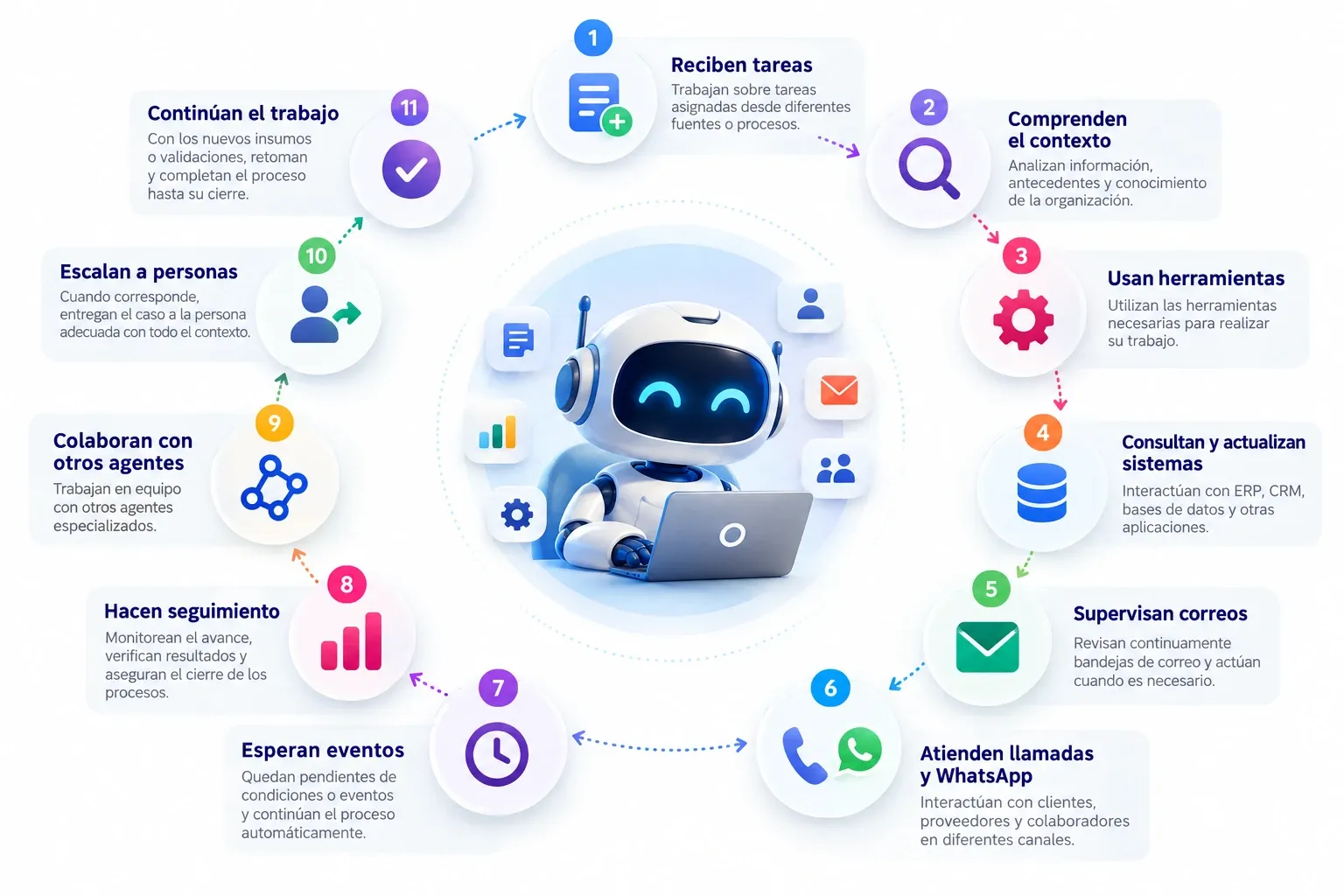
A Workforce AI agent doesn't just answer questions: it receives work, carries it out in your systems and takes it through to completion.

Circular infographic (text in Spanish): the agent at the center and, around it, the eleven capabilities it works with, from receiving tasks to continuing the work through to completion.
  1. Receive tasksThey work on tasks assigned from different sources or processes.
  2. Understand the contextThey analyze information, background and the organization's knowledge.
  3. Use toolsThey use the tools needed to do their work.
  4. Query and update systemsThey interact with ERP, CRM, databases and other applications.
  5. Monitor emailThey continuously check inboxes and act when needed.
  6. Handle calls and WhatsAppThey interact with customers, suppliers and employees across different channels.
  7. Wait for eventsThey stay on standby for conditions or events and continue the process automatically.
  8. Follow upThey monitor progress, verify results and make sure processes are completed.
  9. Collaborate with other agentsThey work as a team with other specialized agents.
  10. Escalate to peopleWhen appropriate, they hand the case to the right person with all the context.
  11. Continue the workWith new inputs or validations, they pick the process back up and complete it through to completion.

A chatbot answers. An agent works.

The difference is in what happens when no one is typing: the agent watches its channels, waits for what the process needs and comes back to each case until it is closed.

  • Monitor
  • Wait
  • Follow up
Human-in-the-loop

People + agents: automating doesn't mean losing control

Agents take on the operational work and people keep the judgment. Your organization decides what the agent resolves on its own, what a person must approve and when the case moves to your team.

  1. The agent resolvesTasks within its autonomy and its rules.
  2. The agent proposes, the person approvesSensitive actions that require approval.
  3. The person decidesExceptions and escalated cases, with all of the agent's context.
  1. Defined autonomy

    Each agent acts with the level of autonomy you assign for each task.

  2. Approval requests

    Before a sensitive action, the agent asks the responsible person for approval.

  3. Escalation

    When appropriate, it hands the case to the right person with all the context.

  4. Exceptions

    Cases that fall outside the rules are set apart and resolved with human judgment.

  5. Gradual trust

    Autonomy is expanded in stages, as the agent proves results in your operation.

  6. Human feedback

    Your team's corrections and comments feed the agent's controlled improvement.

Enterprise knowledge

An agent is only as good as the knowledge and context it handles

Workforce AI lets you create, manage and improve your organization's knowledge so each agent acts the way your best team would.

  1. Knowledge creation

    Tools to capture and write the knowledge the agent needs.

  2. Knowledge management

    Manage from the platform the knowledge each agent uses.

  3. Optimization

    Improve and enrich existing knowledge so the agent can make better use of it.

  4. RAG

    The agent retrieves the relevant information from your documents and sources, and works based on it.

  5. Instructions

    Rules, criteria and steps that define how the agent should act in each task.

  6. GIITIC best practices

    Prebuilt instructions with the practices we apply when automating each process.

  7. Business context

    Your organization's policies, products, structure and way of working.

  8. Memory and continuity

    The agent keeps the context of each case and picks the work back up where it left off.

Knowledge

What to know and how to act

  • Policies and procedures
  • Instructions and criteria
  • Documents and manuals
  • Process best practices

It is prepared, governed and improved in Workforce AI.

Transactional data

The current state of your business

  • Customers and suppliers
  • Orders, invoices and payments
  • Inventory and documents
  • Status of each process

It is queried and updated in your systems, through integrations.

How they connect
Integration

Connect your agents with your company

To do real work, an agent needs to query information and run actions in your systems. Workforce AI connects it with your environment, whether GIITIC or third-party systems.

  • ERP
  • CRM
  • Email
  • Documents
  • Databases
  • External services
  • APIs
  • Tools and actions
  • MCPModel Context Protocol
  • ExtensibilityCustom integrations
Platform

Main Workforce AI features

The enterprise platform capabilities that let you operate, govern and measure all your agents.

Workforce AI features

Manage your agents

Manage dozens of agents from a single place: create, configure, activate and version them.

Main capabilities

  • Centralized management
  • Agent creation and configuration
  • Activation and deactivation
  • Prebuilt agents
  • Versioning
  • Configuration of knowledge, tools, models and instructions

Omnichannel

The different channels use the same agents, knowledge, context, tools and controls.

Main capabilities

  • Email
  • Chat and WhatsApp
  • SMS
  • Calls and IVR
  • Tasks
  • Video calls

Governance, security and control

Govern the creation, publication and operation of agents with identities, permissions, policies and limits on what they can do.

Main capabilities

  • Agent and user identity
  • Authentication
  • Secrets and credentials
  • Roles and permissions
  • Policies and limits on actions
  • Approvals
  • Access to information and tools
  • Governance of creation, publication and operation

Traceability and audit

Historical evidence of every action by the agents, for audit and compliance.

Main capabilities

  • What the agent did and when
  • What item it acted on
  • What tools it used
  • What actions it executed
  • What approvals it received
  • What the result was

Operational supervision

Observability of the entire operation: what your agents are doing and what needs attention.

Main capabilities

  • Active agents and executions
  • Tasks and pending items
  • Times
  • Errors and exceptions
  • Escalations
  • Tools used
  • Situations that need attention

Quality and results

Evaluate your agents and measure their contribution with general indicators and KPIs specific to each process.

Main capabilities

  • Agent evaluation
  • Accuracy and quality
  • Compliance with instructions
  • Effectiveness and productivity
  • Volume processed and times
  • Automation and success rate
  • Human intervention
  • KPIs specific to each process

Usage and costs

Measure AI usage and cost by organization, area, person, agent, process, task, model and period.

Main capabilities

  • Tokens and calls
  • Models, tools and resources used
  • Usage by organization, area and user
  • Usage by agent, process and task
  • Usage by model and period
  • Usage limits, budgets and alerts
Multi-model

The best AI for each job

Workforce AI doesn't tie you to a single AI model. Each agent and each task can use the most suitable model, and your operation can adopt new technologies as they appear.

Choose the model based on

  • Quality
  • Cost
  • Speed
  • Risk
  • Specialization
  1. Multi-model management

    Manage from the platform the models your agents use.

  2. Evaluation of new versions

    Test new models and versions with your cases before taking them to production.

  3. New technologies

    Adopt new AI capabilities without being tied to today's technology.

Continuous improvement

Agents that keep improving

After going into production, each agent evolves with what your operation learns. Improvement is controlled and governed: no change reaches production without being evaluated.

  1. ResultsResults, evaluations, exceptions and feedback.
  2. ImprovementsAdjustments to knowledge, instructions and configuration.
  3. New versionChanges are grouped into an agent version.
  4. EvaluationThe version is tested before reaching production.
  5. DeploymentIt is released in a controlled way and measured again.
  • No unsupervised self-learning
  • Every change is versioned
  • Evaluation before every deployment
Workforce AI + GIITIC

Much more than an agent

Behind every agent are GIITIC's ecosystem, integrations and experience.

modules
40+
ready-made agents
20+
integrations
100+
years automating processes
15+
countries
10+
Next step

Which agents can your company adopt?

Let's review your processes and your systems together to identify where an agent can take on real work and what the best starting point is.

  • Processes with the most potential for agents.
  • Catalog agents that fit your operation.
  • Systems and knowledge needed to get started.

Find out which agents you can adopt

Fill in your details and a consultant will contact you.

Fields marked with * are required.

Open in a new tab