
Smart Enterprise Search
See how enterprise information search is evolving in organizations with AI agents.
- Prebuilt agent Ready to use, we do not start from scratch.We start from an agent prepared for this process and configure it with your rules, your systems and your way of working.
- Best practices Built in from day one.The agent's instructions incorporate the process practices we have applied when automating it in different organizations.
- Configured by experts Functional and technology consultants.Specialized consultants support the configuration, integration, testing and go-live of the agent in your operation.
- Agent platform Workforce AI.The agent runs on Workforce AI, GIITIC's own platform that centralizes security, permissions, audit, usage and administration of all your agents.
- Process experience Processes + technology + enterprise software.Behind every agent are years of experience implementing enterprise software and automating processes in companies across Latin America.
- GIITIC software ecosystem The tools the agent needs.We integrate with your current systems and, if you are missing one, the GIITIC ecosystem provides the modules the agent needs to query and act.

How it is done today, and why it is no longer enough
Information is increasingly scattered: according to Gartner, a desk worker uses an average of 11 applications, up from 6 in 2019, and 47% struggle to find what they need.
- Information in many systems
- Isolated search tools
- Unconnected data
- Questions to other departments
- Uneven access
- Unprepared meetings
Smart Enterprise Search agent

I'm an artificial intelligence agent trained by experts, ready to use and built with best practices. I am here to help you find what you need, wherever it is: I search documents, ERP, CRM, email and other sources in your company, connect what I find about a customer, supplier, project or topic, and show it to you with a link to each source, respecting your permissions. If something isn’t in the systems, I ask the person who knows.
Prebuilt, but adaptable to each organization.
How I work
- I detectSearchI understand what you’re looking for, even if you write it in natural language or with incomplete names.
- I understandPermissionsI identify who is searching and which systems and records they can access.
- I analyzeAll sourcesI search documents, ERP, CRM, email, chat and databases at the same time.
- I decideRelationshipsI connect the results by customer, supplier, project, product or person and remove duplicates.
- I executeResults with sourcesI show you the most relevant results, summarized, with a link to each record or document.
- I verifyGaps and freshnessI flag contradictory or outdated data and ask about whatever isn’t in the systems.
Results you can achieve
- of time is lost searching for answers
- 25%Survey of 12,000 knowledge workers and 200 executives in six countries.Source: Atlassian survey, 2025
- of the workday goes to searching for information
- 19%Knowledge workers spend close to a fifth of their time searching for internal information or for colleagues who can help them.Source: McKinsey Global Institute, 2012
- in time spent searching for information
- −35%Estimate: a knowledge record that can be searched reduces by up to 35% the time spent searching for company information.Source: McKinsey Global Institute, 2012
Reference values based on benchmarks and comparable scenarios. Results depend on the characteristics of each operation and are not guaranteed results.
Greater speed, higher quality, lower costs

Greater speed
Automate tasks and connect your information so your team responds sooner and your processes move forward without waiting.
- Finds in seconds what used to take logging in to several systems
- Prepares the situation of a customer or supplier before a meeting
- Avoids waiting for another department to send the information
- Understands natural-language searches, without needing to know where the data is

Higher quality
Standardize the work and control every step so your information is reliable and your results are consistent.
- Shows the full picture, not just what’s in one system
- Cites the source of each data point so it can be reviewed
- Flags contradictory or outdated data across systems
- Respects each person’s permissions in every source

Lower costs
Reduce rework, errors and manual work so your operation delivers more with the same resources.
- Reduces the hours spent searching for information
- Decreases information requests between departments
- Avoids duplicate work caused by not finding what already exists
- Makes use of the information the company already has
Artificial intelligence in enterprise information search
Before
- 9:00 a.m.9:00 a.m. · MilestoneThe account manager needs the customer’s complete situation for the meeting
- 9:00 a.m.9:00 a.m. · PersonChecks orders and invoices in the ERP30 min
- 9:30 a.m.9:30 a.m. · PersonReviews open opportunities and cases in the CRM20 min
- 9:50 a.m.9:50 a.m. · PersonLooks for the contract and the latest emails in folders and the inbox30 min
- 10:20 a.m.10:20 a.m. · Lost timeAsks accounts receivable for the payment status and customer service for the details of a claim, and waits3 h 40 min
- 2:00 p.m.2:00 p.m. · PersonPulls the information together into a note for the meeting40 min
- 2:40 p.m.2:40 p.m. · MilestoneNote ready 20 minutes before the meeting
Now
- 9:00 a.m.9:00 a.m. · MilestoneThe account manager needs the customer’s complete situation for the meeting
- 9:00 a.m.9:00 a.m. · AgentSearches for the customer in the ERP, CRM, documents and email, and connects orders, invoices, cases, the contract and communications2 min
- 9:02 a.m.9:02 a.m. · AgentFinds an open claim tied to an overdue invoice and shows the details with a link to each source1 min
- 9:03 a.m.9:03 a.m. · AgentA payment agreement doesn’t appear in the systems; asks the accounts receivable analyst< 1 min
- 9:04 a.m.9:04 a.m. · Lost timeThe accounts receivable analyst replies30 min
- 9:34 a.m.9:34 a.m. · PersonThe analyst confirms the payment agreement5 min
- 9:39 a.m.9:39 a.m. · AgentDelivers the customer summary with its sources to the account manager< 1 min
- 9:40 a.m.9:40 a.m. · PersonThe account manager reviews the summary10 min
- 9:50 a.m.9:50 a.m. · MilestoneCustomer situation ready in the morning
Tangible results in your operation
| Indicator | Before | Now | Factor |
|---|---|---|---|
| End-to-end cycle time | ≈ 5.7 h | ≈ 50 min | ×6.8 |
| Human work time | 2 h | 15 min | ×8 |
| Waiting time | 3 h 40 min | 30 min | ×7.3 |
| Human intervention | 100% | ≈ 40% | ÷2.5 |
| Team capacity | 1× | ≈ 2.5× | ×2.5 |
Illustrative reference scenario. Times depend on each operation and are validated with your data.
Your team moves from operating to deciding
The capacity the agent frees up goes to analysis, decisions, relationships, exceptions, improvement and innovation.
No more low-value manual tasks
- Logging in to several systems to put together a complete view
- Requesting information from other departments by email
- Copying data from one system to another to compare it
- Searching for documents in folders and inboxes
- Redoing work that already existed somewhere else
The team adds value to the operation
- Better preparing meetings and decisions
- Analyzing information instead of gathering it
- Serving customers and suppliers with the full picture
- Detecting inconsistent data so it can be corrected at its source
- Collaborating with the people who already know the topic
Your team's professional growth
- Information sources ownerDefines which systems the agent searches and maintains their quality.
- Agent supervisorReviews the quality of results, adjusts sources and permissions, and governs the agent’s knowledge.
- Permissions administratorEnsures each person finds only what they’re entitled to.
Agents are only as good as the knowledge and context they handle
It is one of the great challenges of enterprise artificial intelligence (AI): an agent without clear rules, reliable data and business context makes mistakes or stops. That is why knowledge is prepared, governed and improved as part of the project.
- Company systems and information sources
- Key entities and how they’re identified in each system (customers, suppliers, products, projects)
- Code and name equivalences across systems

The knowledge this agent handles
- Search permissions by role, department or location
- People to ask for each type of data
- Acronyms, terms and internal names used by the company
60%
of AI projects without AI-ready data will be abandoned through 2026, according to Gartner. Gartner, “Lack of AI-Ready Data Puts AI Projects at Risk,” February 2025
Workforce AI helps you prepare, govern and improve it
- Instructions prebuilt by experts
- Process best practices
- Tools to create and capture knowledge
- Knowledge management
- Integration with your current sources
- Enrichment of existing knowledge
- Ongoing updates
- Knowledge governance
- Continuous learning and improvement
We integrate with your environment
We connect the agent with virtually any application, API, service or data source in your company, whether GIITIC or third-party systems.
Integrations this agent requires
- ERP, CRM and business systemsYour ERP or CRM (SAP, Salesforce or others) or GIITIC: customers, suppliers, orders, invoices and cases.
- Documents, email and chatSharePoint, Google Drive, document management system, email, Teams or Slack.
- Directory and permissionsUser directory and permissions, to show only what each person can see.

Your agent, connected to your operation
Base systems for agents
If you do not have the base system, we provide reduced versions of GIITIC modules with the capabilities the agent needs to work.
- CRM for agentsA reduced version of GIITIC CRM: customers, contacts, opportunities and interaction history.
- Document Management for agentsA reduced version of GIITIC Document Management: documents, case files, versions and permissions.
- Applications and ERP
- APIs and web services
- Databases and files
- MCP (Model Context Protocol), when applicable
An agent needs software tools to query information and carry out actions. Without them, it stays a conversation. That is why we cover both paths: connecting to what you already have or giving you what you are missing.
See GIITIC integrations95%
of organizations struggle to integrate AI into their existing processes. MuleSoft (Salesforce), Connectivity Benchmark Report 2025, study sponsored with Vanson Bourne and Deloitte Digital
Today it is one agent, tomorrow dozens
Every area will add agents working at the same time. Workforce AI is the control center of your digital workforce, not an isolated script.
Explore Workforce AI- Agent creation and management
- Security, identities and permissions
- Policies and human oversight
- Traceability and audit
- Observability, quality and results
- Models, tokens, usage and costs
- Continuous updates to new AI models and features
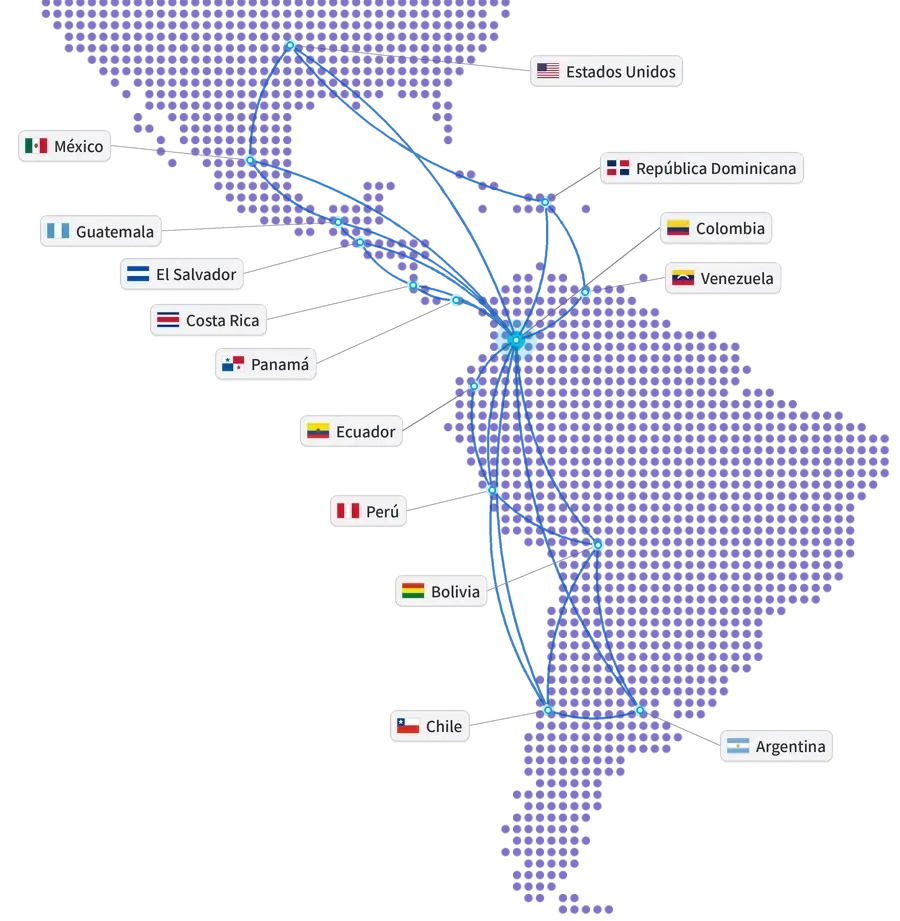
Global experience at your service
- Years of experience
- 15+
- Companies in Latin America
- 850+
- Countries
- 10+
- Integrations
- 100+
- ERP and ERP+ modules
- 40
- AI agents
- 20+
Companies that trust GIITIC






Questions about Smart Enterprise Search
Which sources can the artificial intelligence agent search?
How is it different from each system’s own search?
Can it show me information I don’t have permission to see?
Does the agent modify the information in my systems?
How is it different from the internal knowledge agent?
Do I need GIITIC, or can I use my current systems?
Who controls what the agent does?
How long does implementation take, and how much does it cost?
 Next step
Ready to see your agent work in your process?
Let's talk about your operation. A consultant will review your process, your systems and your knowledge, and show you how the agent would work with your rules.
- Demo of the agent with cases from your process.
- Review of your systems and the available knowledge.
- Estimate of the scope and the next step.
Let's talk about your process
Fill in your details and a consultant will get in touch with you.
Registration successful
We'll be in touch with you shortly.