
GIITIC Remote Work Monitoring

Everything you expect from remote work monitoring software. And much more.

  • Adapts to your business Your operation, your rules.We start from best practices, but we understand that every company is different. We adapt GIITIC to your processes, even when they are complex, without forcing you to change your operation to fit the software.
  • Integration experts 100+ integrations.We connect GIITIC with your technology ecosystem: modern, in-house or legacy systems. We have more than 100 integrations and the experience to build the ones your operation needs.
  • We solve problems, not just implement We take charge from start to finish.We avoid the typical implementation problems: incomplete scopes, consultants who do not understand the operation, or features that do not solve the need. You work with experts focused on making the solution work from start to finish.
  • Record-time implementation and support Experience + tools + AI.We are experts in what we do. We combine experience, methodology, tools and AI to speed up every stage, deliver implementations in weeks and resolve your needs with agility.
  • AI + Agents + Intelligent analytics Much more than AI features.AI features included in the software that you can extend with agents and intelligent data analytics. All connected in one ecosystem and with a single vendor.
  • One single plan No tiers or hidden costs.All of the product’s functionality is included from the start. No multiple editions, locked features or hidden costs that complicate the administration of your solution.

Do you know if your operation is at risk?

These are common signs of teams that work without technology.

  • No visibility into remote work
  • Different rules for employees and contractors
  • Telework workstations without a validation visit
  • Paper-based ergonomic evaluations with no history
  • Safety findings without an action plan
  • Evidence uploaded from any location
  • Reserved desks that nobody uses
  • Contractor hours that are hard to verify
  • Schedules and overtime without control
  • Personal data authorizations with no record
  • Evidence scattered across systems for the ARL or an inspection
  • Monitoring that breeds distrust

How does GIITIC Remote Work Monitoring improve my operation?

  • Greater speed

    Automate tasks and connect your information so your team responds sooner and your processes move forward without waiting.

    • Records active time and program use automatically from the desktop app
    • Plans, runs and closes on-site or remote workstation validation visits
    • Issues the approved, conditionally approved or not approved opinion according to your rules
    • Confirms desk occupancy with QR codes and releases the desks that go unused
    • Sends approved hours and overtime to payroll at period close
    • Exports reports and evidence for the ARL and the Ministry of Labor without building them by hand
  • Higher quality

    Standardize the work and control every step so your information is reliable and your results are consistent.

    • Applies to each employee the policy, schedule and operating mode that corresponds to them
    • Verifies that the visit evidence is uploaded from the authorized address
    • Evaluates workstations with ergonomic criteria defined by your company and keeps their history
    • Turns each finding into an action plan with an owner, a date and an effectiveness check
    • Records the authorizations, privacy notice and policy acceptance of each employee
    • Audits every query of an employee’s individual detail
  • Lower costs

    Reduce rework, errors and manual work so your operation delivers more with the same resources.

    • Uses the office desks you really need, based on occupancy and no-show data
    • Detects repetitive tasks that can be automated
    • Avoids paying for unsupported contractor hours or unapproved overtime
    • Reduces on-site visits with remote validations when the policy allows it
    • Keeps telework and occupational health and safety evidence ready for audits and inspections
    • Connects time with projects and clients so you can bill or settle with supporting records

Take your company to the next level with AI

  • Built-in AI features

    • AI assistant for visits and ergonomics that guides the visit, analyzes the evidence and proposes findings for the professional to validate
    • Diagnosis of time-use patterns with recommendations for the team leader
    • Detection of repetitive tasks and proposals for automation opportunities
    • Schedule and activity anomaly alerts for the designated owner
    • Natural-language queries on occupancy, telework adoption and aggregated time use
  • Workforce AI

    If you want to go further, our autonomous agents take on operational tasks in any area of the company, with human oversight and central governance.

    • OpenAI
    • Anthropic
    • Gemini
    Explore Workforce AI
  • Analytics

    If you want more advanced AI-powered data analysis, Analytics applies forecasting, predictions, anomaly detection and optimization to your operational data.

    Explore Analytics

Manage what really matters

GIITIC Remote Work Monitoring controls each agreement, policy, visit, action plan, booking and activity record, from the moment an employee starts teleworking until the period is closed.

  1. Identify
  2. Characterize
  3. Classify
  4. Relate
  5. Manage
  6. Act
  7. Close
  • Telework agreements

    Teleworking employee with their arrangement, geo-referenced authorized location, data authorizations and validity.

  • Monitoring policies

    What is recorded, in what schedule and mode, and who sees it, by profile, with notice and acceptance by the employee.

  • Validation visits

    On-site or remote visits to the workstation with a checklist, ergonomic evaluation, evidence and an opinion.

  • Action plans

    Visit findings turned into actions with an owner, a date and an effectiveness check.

  • Desk bookings

    Desks by site and day with QR check-in, automatic release, visitors and complementary services.

  • Activity records

    Active and idle time, programs, sites and time per task or project according to the policy in force.

Solutions for every role

Everyone who manages telework, looks after workstation health, leads a team or works remotely finds what they need: queries, transactions, reports and indicators.

Solutions for every role

Human resources

Self-service de consulta

  • Teleworking employees, agreements and authorized locations
  • Policies in force

Self-service transaccional

  • Agreements, profiles and policies
  • Overtime approval
  • Period close

Reportes

  • Telework adoption
  • Reports for the ARL and the Ministry of Labor

KPI

  • Employees with a validated workstation
  • App adoption

Occupational health and safety

Self-service de consulta

  • Scheduled visits and opinions
  • Open findings

Self-service transaccional

  • Validation visits with the AI assistant
  • Ergonomic evaluation
  • Action plans and their verification

Reportes

  • Evaluations and their history
  • Findings by type

KPI

  • Approved workstations
  • Effective action plans

Team leader

Self-service de consulta

  • Aggregated dashboard of their team from the app
  • Schedule and activity alerts

Self-service transaccional

  • Task assignment
  • Timesheet approval

Reportes

  • Time by project and client
  • Time-use patterns

KPI

  • Team active time
  • Schedule compliance

Site administration

Self-service de consulta

  • Desk occupancy by site and day
  • Visitors of the day

Self-service transaccional

  • Desks, spaces and complementary services
  • Visitor registration

Reportes

  • Occupancy, no-shows and underused spaces

KPI

  • Desk occupancy
  • No-shows

Management

Self-service de consulta

  • Telework and spaces dashboard from the app

Self-service transaccional

  • Approval of policies and operating modes

Reportes

  • Telework adoption and trends
  • Export to Excel and Power BI

KPI

  • Productive share of time
  • Site occupancy

Employee

Self-service de consulta

  • Their own time summary
  • Their agreement, visits and action plans

Self-service transaccional

  • Desk booking with QR check-in
  • Upload of visit evidence
  • Acceptance of the policy and data authorizations

Key features

Key features

Policies and operating modes

Define by profile what is recorded, in what schedule and mode, with notice, acceptance and configurable privacy.

Activity records

Records active and idle time, programs, sites and screenshots according to the policy, from the desktop app.

Time, overtime and contractors

Links time to tasks, projects and clients and sends overtime and contractor hours for approval.

Agreements and authorized location

Manages telework agreements with their geo-referenced authorized location, aligned with Colombian regulations.

Workstation validation visits

Plans, runs and closes on-site or remote visits with checklists, evidence and an automatic opinion.

Ergonomics and action plans

Evaluates workstations with your ergonomic criteria, compares their history and turns findings into action plans.

Desk booking with QR

Books desks by site and day, confirms occupancy with QR codes, releases unused ones and includes visitors and services.

Occupancy dashboards and analytics

Measures time, productivity by category, occupancy, no-shows and telework adoption in aggregated dashboards.

Personal data protection

Manages authorizations, sensitive data, the privacy notice and data subject rights under Law 1581 of 2012.

Reports for the ARL and the Ministry

Exports reports and evidence for audits, the ARL and Ministry of Labor inspections.

Learn more about the product

  • GIITIC Remote Work Monitoring
  • Shift and Schedule Management: Shares schedules, shifts, attendance and time-and-attendance events.
  • Project Management: Provides projects and tasks and receives the time recorded.
  • Payroll: Receives approved overtime and contractor hours at period close.
  • Talent and Organization Management: Shares employees’ positions and organizational structure.
  • Compliance and Quality: Receives workstation findings and action plans as support for the management system.
  • Employee Portal: Publishes bookings, agreements, visits and the employee’s own summary.
  • Document Management: Keeps agreements, evidence and reports with their retention.
  • Directory: Users, groups and status from the company directory.
  • Maps: Geo-referencing of the authorized telework location.
  • Collaboration: Productivity, messaging and video call tools for remote visits.
  • Agencies: Exportable reports and evidence for the ARL and the authorities.
  • BI: Aggregated export to Excel and Power BI, respecting permissions.

Connected ecosystem

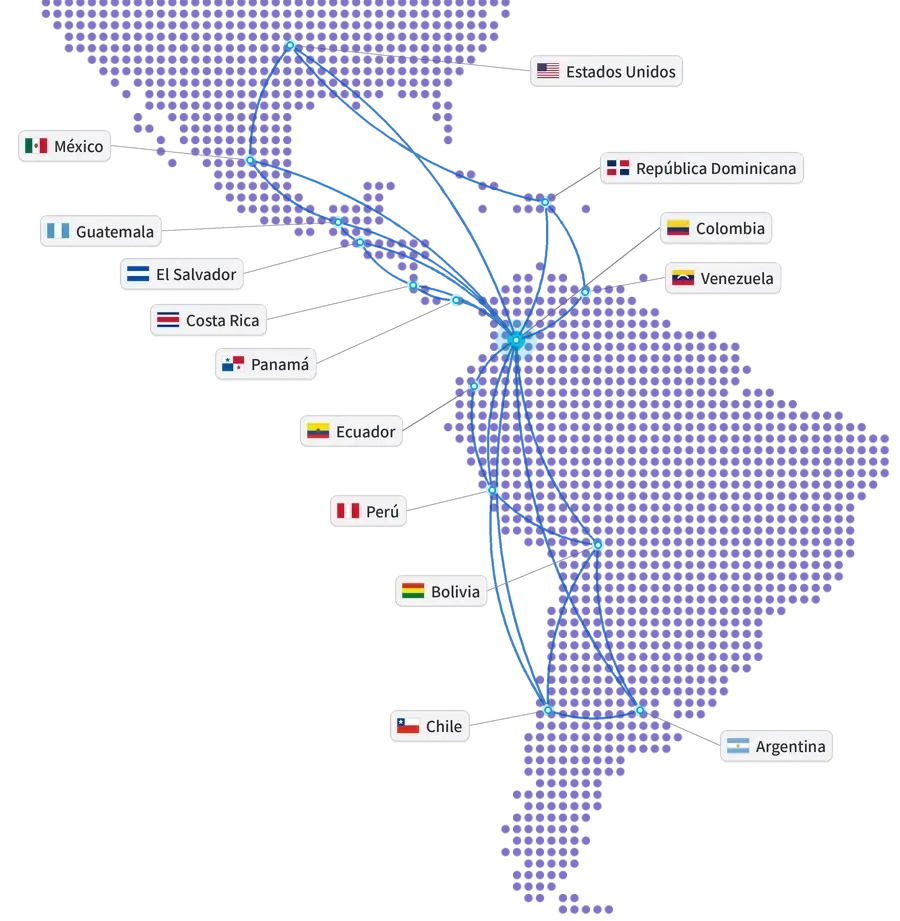
Map of the Americas with the United States, Mexico, Guatemala, El Salvador, Costa Rica, Panama, Dominican Republic, Colombia, Venezuela, Ecuador, Peru, Bolivia, Chile and Argentina connected from Colombia
Our track record

Global experience at your service

Years of experience
15+
Companies in Latin America
850+
Countries
10+
Integrations
100+
ERP and ERP+ modules
40
AI agents
20+

Companies that trust GIITIC

Frequently asked questions

Questions about GIITIC Remote Work Monitoring

Can GIITIC Remote Work Monitoring be integrated with my current ERP and payroll?
Yes. It connects with GIITIC ERP and with the systems you already use: it takes users and positions and delivers approved hours, overtime and contractor hours at period close without re-entering them. The scope of each integration is defined when sizing the project.
Does the software adapt to Colombian telework regulations?
Yes. It manages telework agreements, authorized location, validation visits and evidence aligned with Law 1221 of 2008 and Decree 1227 of 2022, and supports the SG-SST and personal data protection. You configure policies, ergonomic criteria and rules for your company; legal validation remains the employer’s responsibility.
Does GIITIC software include artificial intelligence?
Yes. An AI assistant guides the validation visits, analyzes the evidence and proposes findings for the professional to validate; it also diagnoses time-use patterns, detects repetitive tasks and alerts on anomalies. Your team decides. You can extend it with Workforce AI.
Can my employees use the software from their phones?
Yes. From their phones they book their desk and check in with a QR code, upload evidence for the validation visit and view their own summary. Activity recording runs in the desktop app for Windows and Mac.
What does the software implementation include?
Direct support from the software vendor: we size your policies, profiles and sites with you, configure agreements, visit and ergonomic criteria, bookings and permissions, connect your systems, install the app and give you direct support. Timelines depend on the scope.
Can I use GIITIC Remote Work Monitoring without implementing GIITIC ERP?
Yes. It works on its own and complements the systems your company already has: your approved hours reach its payroll and its projects without changing systems. If you later implement GIITIC ERP or other modules, they connect without duplicating information.
Next step

Ready to transform your process with GIITIC software?

Schedule a guided demo of GIITIC software. A consultant will review how your operation works and show you how the software adapts to your business rules.

  • Explore the software with use cases from your industry.
  • Compatibility assessment with your current ERP and your sales channels.
  • Review of the scope and the next step.

Request a guided demo of the software

Fill in your details and a consultant will get in touch with you.

Fields marked with * are required.

Open in a new tab