
GIITIC Mobile Sales Force

Everything you expect from mobile sales software. And much more.

  • Adapts to your business Your operation, your rules.We start from best practices, but we understand that every company is different. We adapt GIITIC to your processes, even when they are complex, without forcing you to change your operation to fit the software.
  • Integration experts 100+ integrations.We connect GIITIC with your technology ecosystem: modern, in-house or legacy systems. We have more than 100 integrations and the experience to build the ones your operation needs.
  • We solve problems, not just implement We take charge from start to finish.We avoid the typical implementation problems: incomplete scopes, consultants who do not understand the operation, or features that do not solve the need. You work with experts focused on making the solution work from start to finish.
  • Record-time implementation and support Experience + tools + AI.We are experts in what we do. We combine experience, methodology, tools and AI to speed up every stage, deliver implementations in weeks and resolve your needs with agility.
  • AI + Agents + Intelligent analytics Much more than AI features.AI features included in the software that you can extend with agents and intelligent data analytics. All connected in one ecosystem and with a single vendor.
  • One single plan No tiers or hidden costs.All of the product’s functionality is included from the start. No multiple editions, locked features or hidden costs that complicate the administration of your solution.

Do you know if your operation is at risk?

These are common signs of teams that work without technology.

  • Visits with no priorities or preparation
  • Customer information scattered across systems
  • Outdated catalogs and prices
  • Orders jotted down or entered several times
  • Work halted by poor signal
  • Credit, prices or stock that change during the visit
  • Invoices and collections disconnected from the sale
  • Visits with no evidence or result
  • Supervision limited to calls or late reports
  • Price or credit exceptions with no clear approval
  • Returns and consignments with no supporting records
  • Uncontrolled trip expenses

How does GIITIC Mobile Sales Force improve my operation?

  • Greater speed

    Automate tasks and connect your information so your team responds sooner and your processes move forward without waiting.

    • Downloads at the start of the day the schedule, accounts receivable, catalog and conditions of each customer
    • Captures the order during the visit from the phone or tablet, with the visual catalog and search by code or barcode
    • Reuses the customer’s usual order and adjusts it with current conditions
    • Keeps selling offline and syncs when the signal returns, without re-entering data
    • Opens navigation to each location from the customer map
    • Prints or sends the order, quote and payment receipt from the field
  • Higher quality

    Standardize the work and control every step so your information is reliable and your results are consistent.

    • Validates credit, receivables, packaging, prices and stock according to company rules before confirming
    • Shows the age of prices, credit and stock and asks for a review when they exceed the threshold
    • Sends price, discount or credit exceptions for approval with a reason and an owner
    • Records the customer’s signature, location, photos and the result of each visit
    • Distinguishes what was captured, sent and accepted by the ERP in each order and payment collection
    • Keeps a trail of who registered each transaction, when, where and under what conditions
  • Lower costs

    Reduce rework, errors and manual work so your operation delivers more with the same resources.

    • Avoids re-entering field orders, collections, returns and expenses in the ERP
    • Retries interrupted submissions without creating duplicate orders or payments
    • Replaces printed catalogs and paper price lists with the catalog on the device
    • Alerts the supervisor to missed visits, rejected orders and orders pending sync
    • Controls trip expenses with type, supporting document and approval
    • Uses the phones and tablets your sales team already has

Take your company to the next level with AI

  • Built-in AI features

    • Customer summary before the visit: recent purchases, receivables, commitments and previous notes
    • Order suggestion based on the customer’s history, with usual and complementary products
    • Suggested prioritization of the day’s visits based on receivables, frequency and pending commitments
    • Visit logging by dictation, with a summary and commitments to review before saving
    • Assisted order capture from the photo of a list or a customer message
    • Natural-language queries about the team’s sales, goals, coverage and receivables
  • Workforce AI

    If you want to go further, our autonomous agents take on operational tasks in any area of the company, with human oversight and central governance.

    • OpenAI
    • Anthropic
    • Gemini
    Explore Workforce AI
  • Analytics

    If you want more advanced AI-powered data analysis, Analytics applies forecasting, predictions, anomaly detection and optimization to your operational data.

    Explore Analytics

Manage what really matters

GIITIC Mobile Sales Force controls every visit, customer, order and payment collection of your field team, from the moment the day is prepared until the ERP confirms each transaction.

  1. Identify
  2. Characterize
  3. Classify
  4. Relate
  5. Manage
  6. Act
  7. Close
  • Sales visits

    Scheduled or additional visits with location, photos, survey, result, reason for no sale and next step.

  • Customers and locations

    Customer with locations, contacts, territory, receivables, credit limit, purchase history, conditions and requests to add or change.

  • Orders and quotes

    Order or quote with line items, packaging and conditions, validated, signed and sent to the ERP until it is accepted.

  • Field collections

    Payments received with method, amount and reference, receipt, and hand-off to treasury for application.

  • Returns and consignments

    Return or consignment requests with product, reason and evidence, resolved by the ERP and inventory.

  • Trip expenses

    Salesperson expenses with type, supporting document and approval, delivered to the administrative system.

Solutions for every role

Everyone who sells, supervises, manages or collects finds what they need: queries, transactions, reports and indicators.

Solutions for every role

Salesperson or presales rep

Self-service de consulta

  • Schedule and customer map
  • Customer receivables, credit limit and history
  • Catalog, prices and stock
  • Status of their orders and their goal

Self-service transaccional

  • Visits with photos, survey and signature
  • Orders and quotes offline
  • Collections, returns and expenses
  • Requests to add customers

Reportes

  • Their day and their orders of the day
  • Their collections summary

KPI

  • Progress toward their goal
  • Effectiveness of their visits

Sales supervisor

Self-service de consulta

  • Schedule execution and team map from the phone
  • Pending syncs by salesperson

Self-service transaccional

  • Assignment of accounts and schedule
  • Approval of price, discount and credit exceptions from the phone
  • Expense approval

Reportes

  • Schedule compliance and coverage
  • Rejected orders and exceptions
  • Sync diagnostics

KPI

  • Schedule compliance
  • Account coverage
  • Rejected orders

Sales manager

Self-service de consulta

  • Dashboard of the team, territories and products from the app

Self-service transaccional

  • Goals by salesperson, territory, product and period
  • Configuration of visit types, forms and controls

Reportes

  • Sales by salesperson, territory, customer and product
  • Goal progress
  • Export to Excel and Power BI

KPI

  • Value of accepted orders
  • Average order
  • Goal progress

Accounts receivable and treasury

Self-service de consulta

  • Collections captured in the field and their status
  • Receipts and mobile register summaries

Self-service transaccional

  • Review and hand-off of collections for application
  • Review of credit requests

Reportes

  • Collections captured vs. applied
  • Collections pending hand-off

KPI

  • Collections applied
  • Age of pending collections

Customer

Self-service de consulta

  • Order status and ERP reference by email
  • Copy of the order, the quote and the payment receipt

Self-service transaccional

  • Acceptance and signature of the order during the visit
  • Approval of the quote sent by email

Key features

Key features

Workday and visits

Organize the accounts, schedule and map of the day and log each visit with location, result and next step.

Customer context

Check the customer’s account, receivables, credit limit, purchase history and conditions before selling.

Visual catalog

Present products with photos, variants, sales material, packaging and each customer’s current conditions.

Controlled order

Capture the order, validate credit, price and stock, collect the customer’s signature and deliver it to the ERP with a unique key.

Offline work

Keep orders, visits, signatures and photos without signal and sync them on reconnecting, with the age of each data point visible.

Invoicing and collection in the field

Request the invoice from the ERP, record the payment with its method and reference, and deliver receipts and the summary to treasury.

Returns, expenses and evidence

Log returns, consignments, trip expenses, photos and surveys with their supporting documents and approval.

Team supervision

Show goals, coverage, effectiveness, exceptions and pending syncs for each salesperson and territory.

Configuration and security

Configure visit types, forms and controls, and protect access by territory with a complete audit trail.

  • GIITIC Mobile Sales Force
  • CRM: Shares the customer context and receives the result of each visit.
  • Sales: Receives field orders and quotes and returns the reference, status and invoice.
  • Inventory: Provides stock by warehouse and receives reservation, return and consignment requests.
  • Treasury: Receives collections and the mobile register closing to apply and reconcile them.
  • Electronic Documents: Generates and transmits the electronic invoice requested from the field.
  • Commissions and Promotions: Provides current discounts and promotions and returns commission results.
  • Collections: Shares collections management and the payment commitments of the visited customer.
  • Logistics: Receives accepted orders for delivery and shares their status with the salesperson.
  • Enterprise ERP: Takes customers, products, prices, receivables and stock from the ERP you already use and returns orders and collections to it.
  • Maps: Location of customer sites and navigation to each visit.
  • Payments and tax: Payment references and authorization of e-documents.
  • Peripherals: Bluetooth printing of receipts and code scanning from the device.
  • BI: Export of sales, visits and indicators for enterprise analysis.

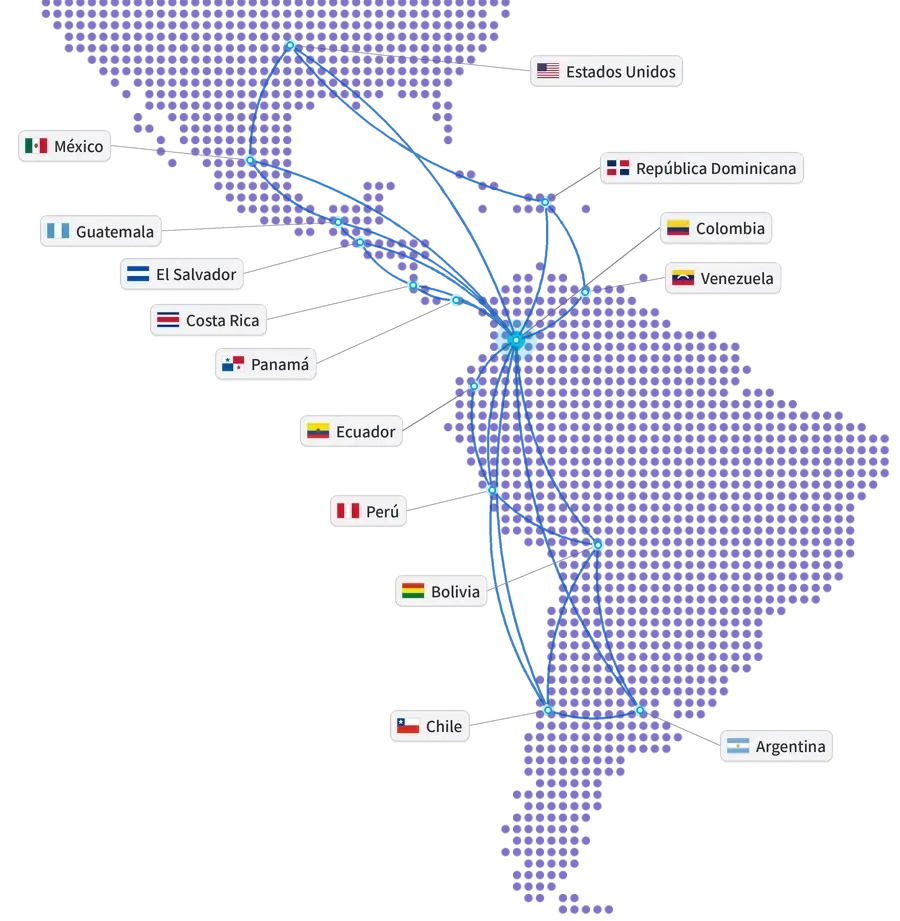
Connected ecosystem

Map of the Americas with the United States, Mexico, Guatemala, El Salvador, Costa Rica, Panama, Dominican Republic, Colombia, Venezuela, Ecuador, Peru, Bolivia, Chile and Argentina connected from Colombia
Our track record

Global experience at your service

Years of experience
15+
Companies in Latin America
850+
Countries
10+
Integrations
100+
ERP and ERP+ modules
40
AI agents
20+

Companies that trust GIITIC

Frequently asked questions

Questions about GIITIC Mobile Sales Force

Does GIITIC Mobile Sales Force integrate with my current ERP?
Yes. It connects with GIITIC ERP and with the enterprise ERP you already use: it takes customers, products, prices, receivables and stock, and delivers orders, collections and returns with a unique reference, without re-entering them. The scope of each integration is defined when sizing the project.
Can I adapt the software to how my team sells?
Yes. You configure visit types, forms, surveys, price lists, credit controls, approvals and permissions by territory. If your operation needs more, our team adapts it as part of the implementation.
Does GIITIC software include artificial intelligence?
Yes. AI summarizes the customer before the visit, suggests the order based on their history, prioritizes the day’s visits, logs the visit by dictation and answers questions about sales and goals. The salesperson and the supervisor decide. You can extend it with Workforce AI agents.
Can I use the software from a phone without an internet connection?
Yes. It works on Android and iOS phones and tablets. Without signal, the salesperson logs visits, orders, signatures and collections; on reconnecting they sync without duplicates and the ERP confirms each transaction.
What does the software implementation include?
Direct support from the software vendor: we size your sales process with you, configure accounts, catalog, conditions and permissions, connect your ERP and your devices, load your current data and give you direct support. Timelines depend on the scope.
Can I use Mobile Sales Force without implementing GIITIC ERP?
Yes. It works on its own and complements the ERP your company already has: your field orders and collections reach its customers, products and inventory without changing systems. If you implement GIITIC ERP or other modules later, they connect without duplicating information.
Next step

Ready to transform your process with GIITIC software?

Schedule a guided demo of GIITIC software. A consultant will review how your operation works and show you how the software adapts to your business rules.

  • Explore the software with use cases from your industry.
  • Compatibility assessment with your current ERP and your sales channels.
  • Review of the scope and the next step.

Request a guided demo of the software

Fill in your details and a consultant will get in touch with you.

Fields marked with * are required.

Open in a new tab