
GIITIC Purchasing

Everything you expect from purchasing software. And much more.

  • Adapts to your business Your operation, your rules.We start from best practices, but we understand that every company is different. We adapt GIITIC to your processes, even when they are complex, without forcing you to change your operation to fit the software.
  • Integration experts 100+ integrations.We connect GIITIC with your technology ecosystem: modern, in-house or legacy systems. We have more than 100 integrations and the experience to build the ones your operation needs.
  • We solve problems, not just implement We take charge from start to finish.We avoid the typical implementation problems: incomplete scopes, consultants who do not understand the operation, or features that do not solve the need. You work with experts focused on making the solution work from start to finish.
  • Record-time implementation and support Experience + tools + AI.We are experts in what we do. We combine experience, methodology, tools and AI to speed up every stage, deliver implementations in weeks and resolve your needs with agility.
  • AI + Agents + Intelligent analytics Much more than AI features.AI features included in the software that you can extend with agents and intelligent data analytics. All connected in one ecosystem and with a single vendor.
  • One single plan No tiers or hidden costs.All of the product’s functionality is included from the start. No multiple editions, locked features or hidden costs that complicate the administration of your solution.

Do you know if your operation is at risk?

These are common signs of teams that work without technology.

  • Purchase orders in spreadsheets and emails
  • Partial receipts that lose track of what is pending
  • Invoices that don’t match what was received
  • The same invoice entered twice
  • Direct purchases that force you to create dummy orders
  • Credit and debit notes without their source invoice
  • Support documents without their adjustment note
  • Totals with tax or rounding errors
  • Suppliers retyped on every document
  • Nobody knows what is still to be received or invoiced
  • Orders that change with no version or approval
  • Purchasing, inventory and payments that don’t add up

How does GIITIC Purchasing improve my operation?

  • Greater speed

    Automate tasks and connect your information so your team responds sooner and your processes move forward without waiting.

    • Turns the purchase order into a delivery note and an invoice without re-entering its lines
    • Imports the supplier’s electronic invoice and suggests its fields for review
    • Copies the lines of a previous order to create the next one
    • Lets you approve purchase orders from your phone
    • Hands the validated invoice to Treasury and Accounting without re-entering it
    • Bulk-loads suppliers, items and documents from Excel
  • Higher quality

    Standardize the work and control every step so your information is reliable and your results are consistent.

    • Calculates quantities, prices, discounts, taxes and totals by line with the same rules
    • Compares order, delivery note and invoice and shows every difference in quantity or value
    • Prevents the same supplier invoice from being entered twice
    • Asks for a new approval when the quantities or values of an order change
    • Links each credit note, debit note and adjustment note to its source document
    • Keeps the change history and the attachments of every document
  • Lower costs

    Reduce rework, errors and manual work so your operation delivers more with the same resources.

    • Keeps a duplicate invoice, or one with quantities not received, from reaching accounts payable
    • Shows what was ordered but not received and what was received but not invoiced on every line
    • Warns about incomplete documents, documents with differences or with pending balances
    • Records direct purchases without creating dummy orders
    • Separates the physical return from its note so the adjustment isn’t applied twice
    • Shares a single supplier record with Inventory, Treasury and Accounting

Take your company to the next level with AI

  • Built-in AI features

    • Reading of supplier invoices and supporting documents to suggest their fields
    • Suggestion of the order and delivery note that match each invoice
    • Explanation of the differences between order, delivery note and invoice
    • Summary of the purchase file for an order or a supplier
    • Natural-language queries about documents, pending items and balances
  • Workforce AI

    If you want to go further, our autonomous agents take on operational tasks in any area of the company, with human oversight and central governance.

    • OpenAI
    • Anthropic
    • Gemini
    Explore Workforce AI
  • Analytics

    If you want more advanced AI-powered data analysis, Analytics applies forecasting, predictions, anomaly detection and optimization to your operational data.

    Explore Analytics

Manage what really matters

GIITIC Purchasing follows each purchase order, delivery note, invoice and purchase note through every stage, with quantities and values linked from start to finish.

  1. Identify
  2. Characterize
  3. Classify
  4. Relate
  5. Manage
  6. Act
  7. Close
  • Purchase orders

    Supplier, lines, quantities, prices and taxes; they are approved, issued with a version and show their balance by line.

  • Purchase delivery notes

    Quantities received, in full or in part, against the order or without a prior order, with the receiver’s supporting document.

  • Purchase invoices

    The supplier’s document with a unique identity, compared with the order and the delivery note before it is validated.

  • Credit and debit notes

    Adjustments to quantities and amounts linked to the purchase invoice, without altering the original document.

  • Support documents

    Purchases from suppliers not required to invoice, with their adjustment note and electronic status.

  • Suppliers

    Basic record with identification, contacts, tax data, currency and terms for each document.

Solutions for every role

Everyone involved in purchasing finds what they need: queries, transactions, reports and indicators.

Solutions for every role

Purchasing assistant

Self-service de consulta

  • Orders by status and balance
  • Incomplete documents or documents with differences

Self-service transaccional

  • Purchase orders from the web or your phone
  • Delivery notes and invoices without a prior order
  • Credit notes, debit notes and support documents

Reportes

  • Open orders by supplier
  • Value pending receipt

KPI

  • Quantity pending receipt
  • Value pending receipt

Warehouse or area receiver

Self-service de consulta

  • Orders pending receipt at their site from the app

Self-service transaccional

  • Recording of quantities received with a photo of the supporting document from the app
  • Returns to the supplier

Reportes

  • Delivery notes by date and order

Purchase invoice owner

Self-service de consulta

  • Received invoices pending comparison
  • Received but not invoiced

Self-service transaccional

  • Invoice import and validation
  • Resolution of differences with their note

Reportes

  • Invoices with differences by reason
  • Support documents pending status

KPI

  • Documents with differences
  • Received but not invoiced

Purchasing manager

Self-service de consulta

  • Orders pending approval from the app

Self-service transaccional

  • Approval of orders and versions from your phone

Reportes

  • Price differences against the order
  • Document adjustments by type

KPI

  • Price difference
  • Document adjustments

Administrative and finance management

Self-service de consulta

  • Purchases pending receipt and invoicing from the app

Reportes

  • Net invoiced purchases by period, supplier and product
  • Purchase file

KPI

  • Net invoiced purchases
  • Value pending receipt

Key features

Key features

Purchase orders

Create, approve and issue orders with quantities, prices, taxes and receipt dates by line.

Purchase delivery notes

Record what was received, in full or in part, against the order or without a prior order, with the receiver’s supporting document.

Purchase invoices

Import or record the supplier’s invoice with a unique identity and link it to the order and the delivery note.

Document comparison

Compare order, delivery note and invoice by quantity and value and see every difference before you validate.

Credit and debit notes

Adjust the quantities and amounts of a purchase invoice with a reference to the original document.

Support document and adjustments

Generate support documents for purchases from suppliers not required to invoice, and their adjustment notes.

Balances and purchase file

Browse the whole chain of each purchase and check what is pending receipt or invoicing on every line.

Suppliers and items

Basic record of suppliers, items and concepts shared by all the documents in the ERP.

  • GIITIC Purchasing
  • Inventory: Receives delivery notes and returns to confirm entries and exits, just once.
  • Treasury: Receives the validated invoice with currency, amount and due date for accounts payable.
  • Accounting: Receives invoices, notes and support documents for its journal entries.
  • Electronic Documents: Receives supplier invoices and transmits support documents and adjustment notes.
  • Imports: Links orders, invoices and notes to the import file.
  • Procurement: Delivers the award with supplier, lines and conditions so the purchase order can be issued.
  • Supplier Portal: The supplier checks their orders and uploads their invoices from the portal.
  • WMS / Warehouse Management: Receives the goods in the warehouse with the delivery note reference.
  • Electronic invoicing: Receipt of supplier invoices and acknowledgments according to the country.
  • Email: Sending of purchase orders as PDFs and receipt of invoices.
  • Excel: Loading of suppliers, items and documents with validation.
  • BI: Export of purchases and balances, respecting permissions.

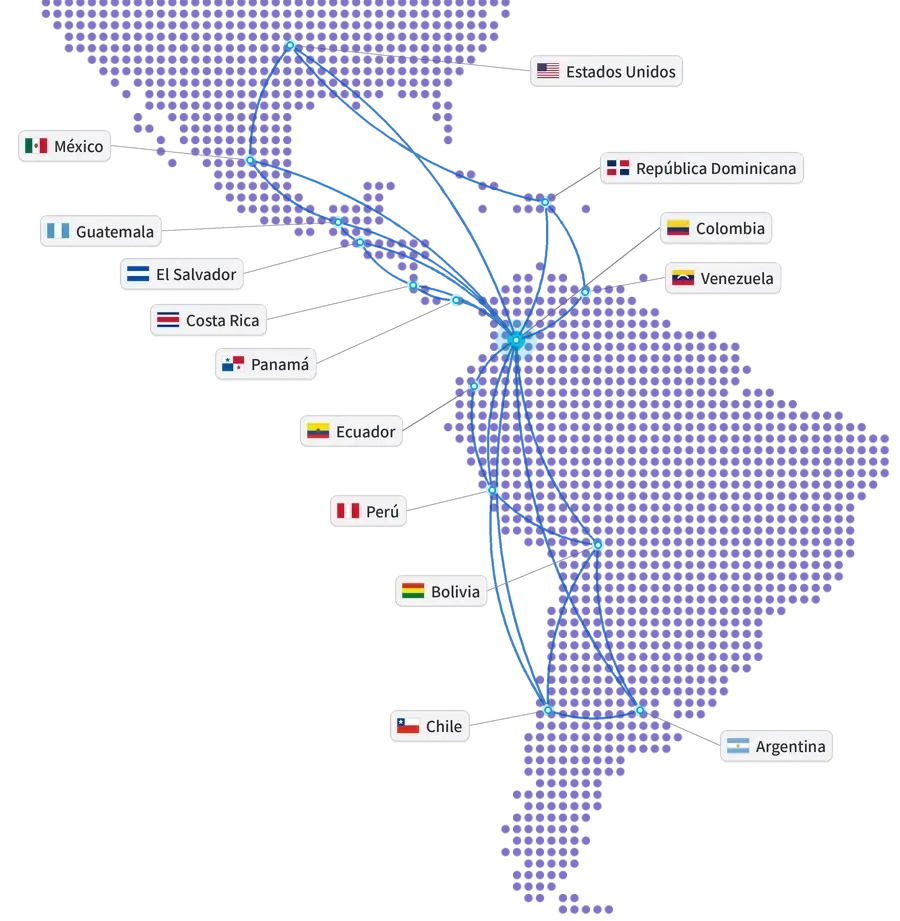
Connected ecosystem

Map of the Americas with the United States, Mexico, Guatemala, El Salvador, Costa Rica, Panama, Dominican Republic, Colombia, Venezuela, Ecuador, Peru, Bolivia, Chile and Argentina connected from Colombia
Our track record

Global experience at your service

Years of experience
15+
Companies in Latin America
850+
Countries
10+
Integrations
100+
ERP and ERP+ modules
40
AI agents
20+

Companies that trust GIITIC

Frequently asked questions

Questions about GIITIC Purchasing

Can GIITIC Purchasing be integrated with other systems?
Yes. GIITIC ERP connects with other systems through APIs, files and events to exchange documents, quantities, values and statuses with unique references that prevent duplicates. The scope of each integration is defined when sizing the project.
Can I adapt it to my purchasing process?
Yes. You configure document types, numbering, approval levels by amount, comparison tolerances, taxes and currencies. If you also need purchase requests, quotes or supplier evaluation, you can add GIITIC Procurement from ERP+.
Does GIITIC Purchasing software include artificial intelligence?
Yes. It includes AI features such as reading supplier invoices and supporting documents, suggesting the order and delivery note for each invoice, explaining differences and natural-language queries. The user reviews before posting. You can extend them with Workforce AI agents and with Analytics models, such as forecasting purchasing needs.
Can I use the software from my phone?
Yes. From your phone you approve purchase orders, check what is pending receipt and record the quantities received with a photo of the supporting document. The app works offline and syncs later, revalidating the data.
What does the software implementation include?
Direct support from the software vendor: we size the scope with you, configure your documents, taxes and approvals, migrate your suppliers and documents with automated tools, connect the systems you need, run the tests and give you direct support. Timelines depend on the scope.
Can I use GIITIC Purchasing without the rest of the ERP?
GIITIC ERP is an integrated system: Purchasing works connected with Inventory, Treasury and Accounting to give you full traceability. It is not sold as a standalone module, but you can start with the modules you need and activate the others when your operation requires it.
Next step

Ready to transform your process with GIITIC software?

Schedule a guided demo of GIITIC software. A consultant will review how your operation works and show you how the software adapts to your business rules.

  • Explore the software with use cases from your industry.
  • Compatibility assessment with your current ERP and your sales channels.
  • Review of the scope and the next step.

Request a guided demo of the software

Fill in your details and a consultant will get in touch with you.

Fields marked with * are required.

Open in a new tab