
GIITIC Correspondence

Everything you expect from correspondence software. And much more.

  • Adapts to your business Your operation, your rules.We start from best practices, but we understand that every company is different. We adapt GIITIC to your processes, even when they are complex, without forcing you to change your operation to fit the software.
  • Integration experts 100+ integrations.We connect GIITIC with your technology ecosystem: modern, in-house or legacy systems. We have more than 100 integrations and the experience to build the ones your operation needs.
  • We solve problems, not just implement We take charge from start to finish.We avoid the typical implementation problems: incomplete scopes, consultants who do not understand the operation, or features that do not solve the need. You work with experts focused on making the solution work from start to finish.
  • Record-time implementation and support Experience + tools + AI.We are experts in what we do. We combine experience, methodology, tools and AI to speed up every stage, deliver implementations in weeks and resolve your needs with agility.
  • AI + Agents + Intelligent analytics Much more than AI features.AI features included in the software that you can extend with agents and intelligent data analytics. All connected in one ecosystem and with a single vendor.
  • One single plan No tiers or hidden costs.All of the product’s functionality is included from the start. No multiple editions, locked features or hidden costs that complicate the administration of your solution.

Do you know if your operation is at risk?

These are common signs of teams that work without technology.

  • Letters received that nobody knows where they ended up
  • Communications with no number or date of receipt
  • Responses sent after the deadline
  • Requests lost in personal email inboxes
  • Documents passed from hand to hand with no record
  • Routing to the wrong department and rework
  • Senders calling to ask about the status
  • Outgoing sequential numbers duplicated or skipped
  • Shipments with no proof of delivery
  • Responses sent without approval or signature
  • Attachments separated from the original communication
  • No data on how long each department takes to respond

How does GIITIC Correspondence improve my operation?

  • Greater speed

    Automate tasks and connect your information so your team responds sooner and your processes move forward without waiting.

    • Automatically files the communications that arrive in the institutional mailbox
    • Uses AI to read the sender, subject and dates so the front desk only has to confirm
    • Routes each communication to the right department and owner according to its type
    • Instantly notifies the recipient with the document image and its attachments
    • Lets you view, process and approve responses from your phone
    • Prepares the response from templates with the filing data
  • Higher quality

    Standardize the work and control every step so your information is reliable and your results are consistent.

    • Assigns each communication a unique number that follows it from start to finish
    • Requires the mandatory data for each type of communication at filing
    • Warns when a communication was already filed or responds to a previous filing
    • Reviews, approves and signs responses before they are sent
    • Records who received, forwarded, responded to or viewed each communication
    • Assigns the series and document type so it reaches its file complete
  • Lower costs

    Reduce rework, errors and manual work so your operation delivers more with the same resources.

    • Eliminates double data entry between the front desk, departments and the archive
    • Avoids rework from lost communications or items routed to the wrong department
    • Reduces follow-up calls because senders check the status themselves
    • Reduces paper copies with digital distribution of documents and attachments
    • Controls waybills, couriers and courier companies with proof of delivery
    • Alerts you to deadlines before they expire to avoid late responses

Take your company to the next level with AI

  • Built-in AI features

    • Reading of the document or email and a proposed sender, subject, dates and communication type at filing
    • Proposed department and owner based on the content of the communication
    • Summary of the communication and its attachments for the recipient
    • Draft response based on the received communication and the type’s template
    • Detection of repeated communications or those related to previous filings
  • Workforce AI

    If you want to go further, our autonomous agents take on operational tasks in any area of the company, with human oversight and central governance.

    • OpenAI
    • Anthropic
    • Gemini
    Explore Workforce AI
  • Analytics

    If you want more advanced AI-powered data analysis, Analytics applies forecasting, predictions, anomaly detection and optimization to your operational data.

    Explore Analytics

Manage what really matters

GIITIC Correspondence follows each communication from the moment it arrives or is drafted until it is answered, delivered and moved to its file.

  1. Identify
  2. Characterize
  3. Classify
  4. Relate
  5. Manage
  6. Act
  7. Close
  • Incoming communications

    Letters, emails and requests that arrive through any channel, with a unique number, sender, attachments, owner and response deadline.

  • Outgoing communications

    Responses and communications to third parties drafted from templates, with approval, signature, outgoing sequential number and proof of sending.

  • Internal communications

    Memos and circulars between departments with a sequential number, recipients, confirmation of receipt and a response when required.

  • Shipments

    Waybills and delivery sheets for physical delivery by in-house courier or courier company, with status, attempts and proof of delivery.

  • Senders and recipients

    People and organizations that send or receive communications, with contact details, filing history and notification channel.

Solutions for every role

Everyone who receives, processes, responds to or delivers communications finds what they need: queries, transactions, reports and indicators.

Solutions for every role

Correspondence front desk

Self-service de consulta

  • Filing inbox by channel
  • History of each filing

Self-service transaccional

  • Filing with label and scanning
  • Routing and delivery sheets
  • Shipment dispatch

Reportes

  • Filings by channel, type and department
  • Delivery sheets pending receipt

KPI

  • Filings of the day
  • Communications not yet routed

Department head

Self-service de consulta

  • Department communications by status and deadline

Self-service transaccional

  • Reassignment and forwarding of communications
  • Approval and signing of responses from the app

Reportes

  • Communications by owner and status
  • Department response times

KPI

  • Responses within the deadline
  • Overdue communications

Employee

Self-service de consulta

  • Assigned communications from the web or the app

Self-service transaccional

  • Response from a template
  • Confirmation of receipt of the physical document
  • Shipment request

Courier

Self-service de consulta

  • Assigned shipments and the day’s route from the app

Self-service transaccional

  • Delivery record with photo and signature
  • Return record with reason

Reportes

  • Shipments by status

KPI

  • Successful deliveries

External sender

Self-service de consulta

  • Status of their filing with the number and a lookup code

Self-service transaccional

  • Online filing with attachments from the web form or the portal

Management and internal control

Self-service de consulta

  • Correspondence dashboard from the app

Reportes

  • Communication volume by channel and department
  • Traceability by filing
  • Export to Excel and Power BI

KPI

  • Average response time
  • Shipments with proof of delivery

Key features

Key features

Single-window filing

File in one place whatever arrives at the front desk, by email or through the web form, with a unique number and label.

Capture and scanning

Scan documents and attachments, read the sender and subject with AI and link the image to the filing with no manual steps.

Routing and distribution

Assign each communication to the right department and owner, with notification and a delivery sheet for the physical copy.

Processing and response deadlines

Control the response deadline of each communication with alerts, forwarding between departments and escalation of overdue items.

Responses and communications

Draft responses and memos from templates, with review, approval, signature and outgoing sequential number.

Shipments and courier

Generate waybills and delivery sheets, assign couriers or courier companies and record delivery with photo and signature.

Search and traceability

Find any filing by number, sender or subject and follow its full history, from receipt to response.

Classification and file

Assign the series and document type at filing and deliver the communication with its attachments to the file in Document Management.

  • GIITIC Correspondence
  • Document Management: Receives each communication with its attachments in its file and applies the retention of its document series.
  • Customer Service: Receives filed customer requests so they can be handled as cases, and returns the response.
  • Contracts: Links filed and sent communications to the contract and its counterparty.
  • Customer Portal: Lets customers file communications and check the status of their filings.
  • Supplier Portal: Lets suppliers file communications and check the status of their filings.
  • Employee Portal: Lets employees view their communications and confirm receipt of documents.
  • Field Work App: Shares delivery routes and the location of couriers in the field.
  • Email: Filing from the institutional mailbox and notification to recipients and senders.
  • Scanners and multifunction printers: Scanning of documents and attachments into the filing.
  • Courier companies: Sending of waybills and receipt of status and proof of delivery.
  • E-signature: Sending of the approved response and receipt of the signed document.
  • Enterprise ERP: Pulls third parties, employees, departments and cost centers from the ERP you already use.

Connected ecosystem

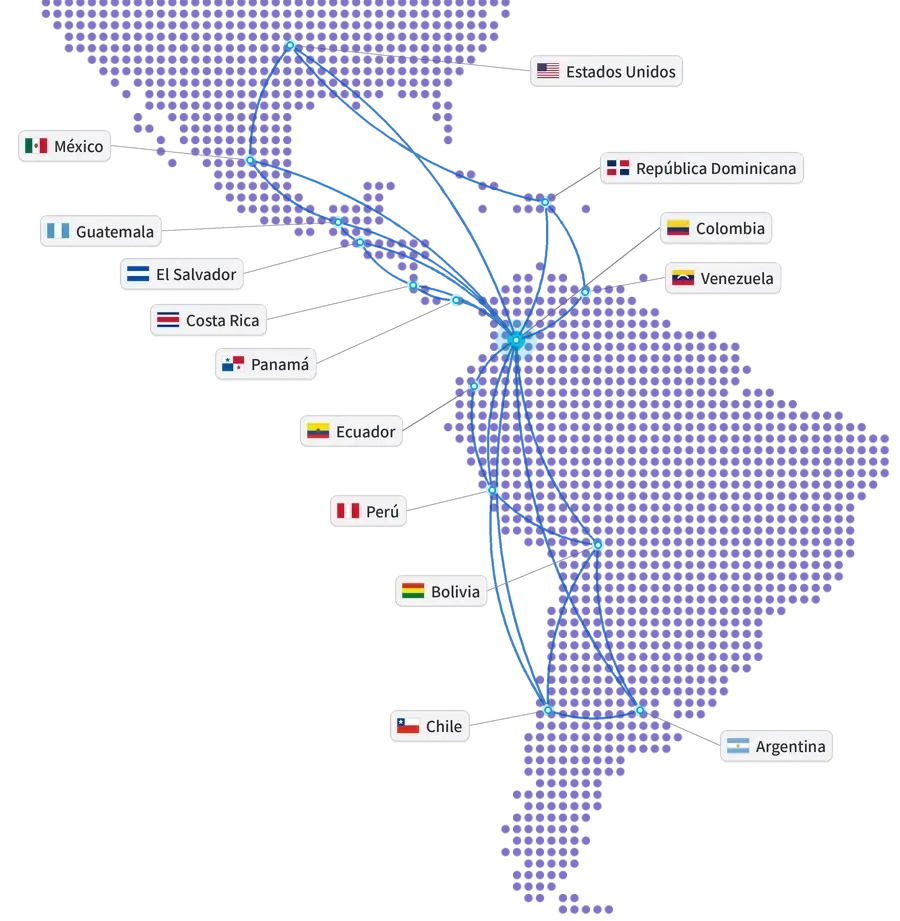
Map of the Americas with the United States, Mexico, Guatemala, El Salvador, Costa Rica, Panama, Dominican Republic, Colombia, Venezuela, Ecuador, Peru, Bolivia, Chile and Argentina connected from Colombia
Our track record

Global experience at your service

Years of experience
15+
Companies in Latin America
850+
Countries
10+
Integrations
100+
ERP and ERP+ modules
40
AI agents
20+

Companies that trust GIITIC

Frequently asked questions

Questions about GIITIC Correspondence

Can GIITIC Correspondence be integrated with my current ERP?
Yes. It connects with GIITIC ERP and with the enterprise ERP you already use through APIs: it pulls third parties, employees, departments and cost centers without duplicating them. It also integrates with email, scanners, courier companies and e-signature services. The scope of each integration is defined when sizing the project.
Can I adapt it to my company’s communication types and deadlines?
Yes. You configure the filing points, the communication types with their mandatory data, routing rules, response deadlines, templates, sequential numbers and permissions. If your process needs more, our team adapts it as part of the implementation.
Does GIITIC Correspondence software include artificial intelligence?
Yes. AI reads documents and emails to propose the sender, subject and type, suggests the responsible department, summarizes the communication and its attachments, prepares a draft response and detects repeated or related filings. Your team reviews and confirms. You can extend it with Workforce AI agents.
Can I use the software from my phone?
Yes. From your phone you view and process assigned communications, approve and sign responses, confirm receipt of documents and, if you are a courier, record each delivery with a photo and signature.
What does the software implementation include?
Direct support from the software vendor: we size the channels, communication types and deadlines with you, configure the front desk, routing, templates and permissions, connect your systems, load your senders and give you direct support. Timelines depend on the scope.
Can I use GIITIC Correspondence without implementing GIITIC ERP?
Yes. GIITIC Correspondence works on its own and complements the ERP your company already has: your communications are linked to its third parties and departments without changing systems. If you later implement GIITIC ERP or Document Management, they connect without duplicating information.
Next step

Ready to transform your process with GIITIC software?

Schedule a guided demo of GIITIC software. A consultant will review how your operation works and show you how the software adapts to your business rules.

  • Explore the software with use cases from your industry.
  • Compatibility assessment with your current ERP and your sales channels.
  • Review of the scope and the next step.

Request a guided demo of the software

Fill in your details and a consultant will get in touch with you.

Fields marked with * are required.

Open in a new tab